How To Import To Zype Using An API
Zype provides a central library to store all of your content, regardless of the source the videos are hosted on. Through our flexible import and upload capabilities, you no longer have to worry about managing your videos on separate platforms. You can import your content to Zype using an API integration. This method requires working with a developer because of the technical nature of APIs. Follow the documentation below and visit our Developer Portal for more information.
API & App Keys#
API Keys
Zype offers three API keys, each allowing different levels of access to your account via API calls:
Admin Key- Admin keys have full access to your account and should not be distributed in video applications.
IMPORTANT: This key should never be made publicly accessible
Read Only Key - Read only keys have limited access to your account to retrieve any content and/or data, and should be used when distributing a video application.
Player Key - Player keys have limited access to your account and are only allowed to issue player requests. Player keys should be used in embed codes for web applications. App Keys
For each App Profile you have generated in Zype, there will be a corresponding App Key. These can be used by developers to access Zype's APIs on a per-app basis. App keys allow developers to create app integrations using your Zype Platform data. App keys can be used for read-only access and player requests. Using app keys for player requests allows you to report on activity per app.
Accessing Your API & App Keys#
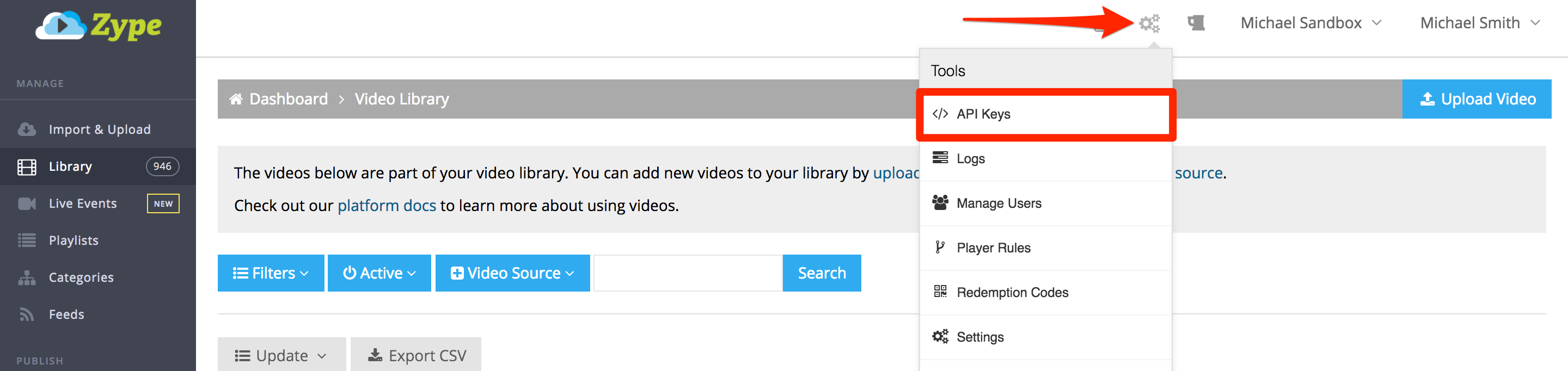
To access the API and App keys, click on the Gear icon.
Select API Keys from the dropdown menu